Enterprise Hardware Solutions: Servers, Storage and Networking
We size your server, storage, network and server room needs against your current usage and expected growth, compare the options by total cost, and manage the whole process end to end, from procurement to installation, acceptance testing and maintenance.
- Scope
- Servers, storage, backup, networking, firewalls, server rooms
- Approach
- Comparison driven by needs and total cost
- Process
- Analysis → sizing → procurement → installation → acceptance → maintenance
- First step
- Free initial consultation; a measurement-based needs analysis if required
When does a hardware investment come up?
A hardware decision shapes capacity, energy consumption and maintenance costs for years to come. That is why we base the decision on measurement.
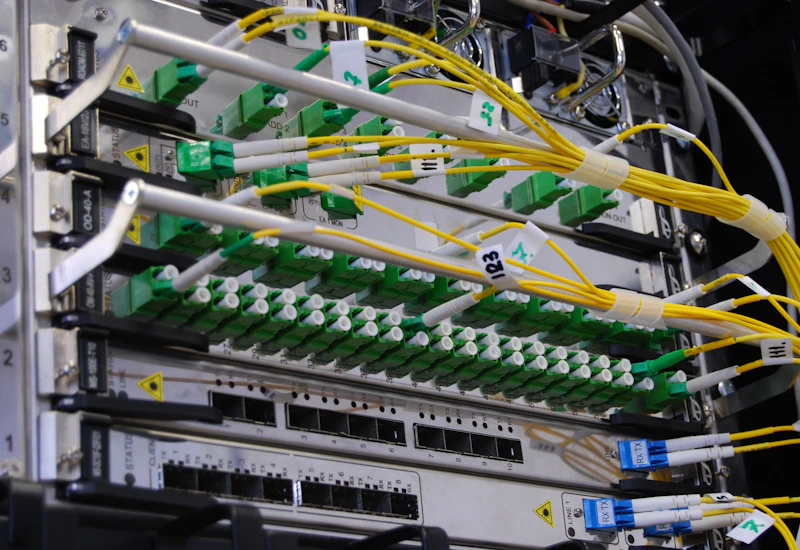
- A server refresh or warranty expiry is approaching. Refreshing, extending support or moving some workloads to the cloud should be compared.
- Quotes from different suppliers need to be evaluated. Which configuration is really needed, and what each quote covers, should be compared against the same criteria.
- Installation, integration and maintenance are handled by different companies. Bringing these steps into a single plan clarifies responsibilities and makes operations easier.
- A new office, branch or server room is being set up. Networking, power, cooling and rack layout need to be planned from the start.
- Server room and cabling documentation is out of date. Documenting rack, cabling and configuration information makes changes safer.
Do you have more than one quote?
Let's review them together in the initial consultation: which configuration you need, and what each quote includes or leaves out, compared against the same criteria.
Request a meetingWhat do we cover in enterprise hardware?
We run every step in a planned way, from needs analysis to day-to-day operation.
Server and virtualization infrastructure
Servers and virtualization hosts sized to the workload; VMware, Proxmox or Hyper-V installation.
Storage and backup
Storage solutions matched to performance and capacity needs; backup, archive and restore infrastructure.
Network infrastructure
Switch, router and wireless network design; segmentation (VLANs), redundant design and network documentation.
Security hardware
Firewall and VPN solutions; rule and policy design, installation, configuration and regular review.
Server room and installation
Rack layout, power and UPS sizing, cooling, cable management and labeling; installation and documentation.
Maintenance and monitoring
Hardware health monitoring, firmware updates, warranty tracking and managing the response when hardware fails.
We choose hardware based on capacity and total cost.
We measure your current usage, factor in your expected growth and compare several options by total cost.
Needs analysis and site survey
We measure current usage, expected growth and critical workloads, and review the state of the server room, racks, power and cabling.
Output: Capacity and requirements reportSizing and options
We compare alternative configurations by total cost of ownership.
Output: Comparative proposalProcurement
We manage the procurement of the approved configuration.
Output: Delivered hardwareInstallation and migration
We install and configure, and migrate from existing systems in a pre-agreed maintenance window with a rollback plan.
Output: Working infrastructureAcceptance testing and handover
We run performance, redundancy and restore tests with you and record the results.
Output: Acceptance test report, handover checklistMaintenance
We support the continuity of the infrastructure through monitoring, updates and fault management.
Output: Maintenance reportsWhat you have after installation.
You know what was installed, how it is configured and how to operate it.
Capacity and requirements report
The sizing rationale, based on measurements.
Infrastructure documentation
Rack, network and configuration diagrams.
Operating procedures
Backup, update and fault-handling steps.
Inventory and warranty tracking
Hardware list, serial numbers and warranty periods.
Acceptance test report
Tests performed, their results and the handover checklist approved with you.
Comparative evaluation
Alternative configurations and quotes compared against the same criteria, by total cost.
Options compared against your needs.
We compare options from different manufacturers against the same criteria, based on your needs, budget and existing infrastructure.
Servers
- Dell PowerEdge
- HPE ProLiant
- Lenovo ThinkSystem
- Cisco UCS
- Supermicro
Storage and backup
- Dell
- HPE
- NetApp
- Pure Storage
- Huawei
- Veeam
Networking and security
- Cisco
- HPE Aruba
- Juniper
- Fortinet
- Palo Alto Networks
Virtualization
- VMware vSphere
- Microsoft Hyper-V
- Proxmox VE
- Nutanix
Power and racks
- APC (Schneider Electric)
- Eaton
- Vertiv
Hardware projects sized to your scale.
SMEs
Refreshing end-of-life server and network hardware in a planned way, or setting up a first server room.
Companies opening a new office or branch
Those who want to plan network, security and systems infrastructure before the move and set it up properly from day one.
Organizations moving to a hybrid setup
Those who want to use the cloud alongside their own infrastructure, with shared management and backup practices.
Making the first meeting productive.
None of these are prerequisites; whatever you have makes the first meeting more concrete.
What you can prepare, if available
- Your current hardware list, with ages and warranty end dates
- Critical workloads and expected growth
- Quotes you have received
- Photos of the server room or racks
- Renewal dates for virtualization and backup licenses
About enterprise hardware
References and standards
- Uptime Institute Tier Standard (opens in a new tab)Data center infrastructure classification
- NIST SP 800-34 (opens in a new tab)IT contingency and recovery planning guide
Let's plan your hardware needs together.
In a free initial consultation we discuss your current situation and goals, and share our first impressions and possible next steps in the same meeting.
- A technical conversation with specialists in your area
- First impressions of your situation and possible approaches
- Where it fits, a next step: an assessment, a project proposal or consulting
- A non-disclosure agreement before the meeting when needed
- A reply within 4 business hours
Enterprise hardware examples from practice
Illustrative scenarios showing how sizing, server room and virtualization work progresses.
Capacity measurement and sizing
Selection starts with measuring current usage. The requirements become a vendor-neutral specification, and quotes are compared against the same criteria.
Measurement
CPU, memory, disk performance (IOPS) and capacity usage of the existing servers and storage are measured over several weeks.
- CPU avg. 38% · peak 71%
- storage 18.4 TB · annual growth 22%
- peak IOPS 14,200
Projection
Five-year requirements are calculated from expected growth, with enough headroom to cope with a single server failure (N+1).
- in 5 years: ≈ 50 TB
- servers: 3 + 1 spare
Specification
The requirements are turned into vendor-neutral technical criteria.
- CPU · memory · disk type · network speed
- warranty and support period
Quote comparison
Quotes are compared on the same criteria and on five-year total cost of ownership.
- Quote A · B · C
- → total cost, support terms, delivery time
Recommendation
The recommendation is shared in writing along with its rationale; the decision is yours.
- ✓ recommendation report delivered
- Performance measurement
- Specification
- Total cost of ownership
Server room setup
Racks, power, cooling and cabling are planned together. The setup is completed with acceptance testing, in which failure scenarios are tested jointly.
Layout
The rack layout and the power, cooling and cable routes are planned.
- racks: 2 × 42U
- hot / cold aisle layout
Power
Devices are fed from two separate power feeds (A/B); UPS capacity and runtime are calculated.
- PDU-A 2.4 kW · PDU-B 2.3 kW
- UPS 10 kVA · estimated runtime 18 min
Cooling and monitoring
Temperature and humidity sensors are connected to the monitoring system, and alerts are defined for thresholds.
- inlet temperature 22.4 °C · humidity 45%
- ✓ alert thresholds defined
Cabling and labeling
Cables, ports and devices are labeled and documented following a standard scheme.
- R1-U12-P24 → SW-01 Gi1/0/24
Acceptance testing
Power feeds, network redundancy and failure scenarios are tested together.
- ✓ PDU-A cut → service continues
- ✓ core switch 1 shut down → traffic on standby
- 42U rack
- UPS and A/B PDUs
- Environmental sensors
- Labeling
Virtualization cluster and backup
The cluster keeps services running when a single server fails; backups protect the data. The two are designed separately and tested separately.
Cluster
Servers are connected to shared storage to form a virtualization cluster.
- cluster: 3 hosts · shared storage 40 TB
Live migration
Virtual machines move between hosts without being shut down, so host maintenance is planned and done without downtime.
- ✓ file-server → host-02 · no downtime
High availability test
A host is deliberately shut down; its virtual machines restart on the other hosts.
- ! host-01 shut down
- ✓ 12 virtual machines restarted · 2 min 40 s
Backup
Backups follow the 3-2-1 rule: three copies, on two different media, with one off-site.
- backup job: daily at 22:00
- ✓ copy: second site · immutable
Restore test
A virtual machine is restored from backup on an isolated network to confirm that the backup works.
- ✓ restore test: accounting-db · 14 min
- VMware vSphere / Proxmox VE / Hyper-V
- Shared storage
- Veeam